
Italian Trulli

Warehouse Inventory Management

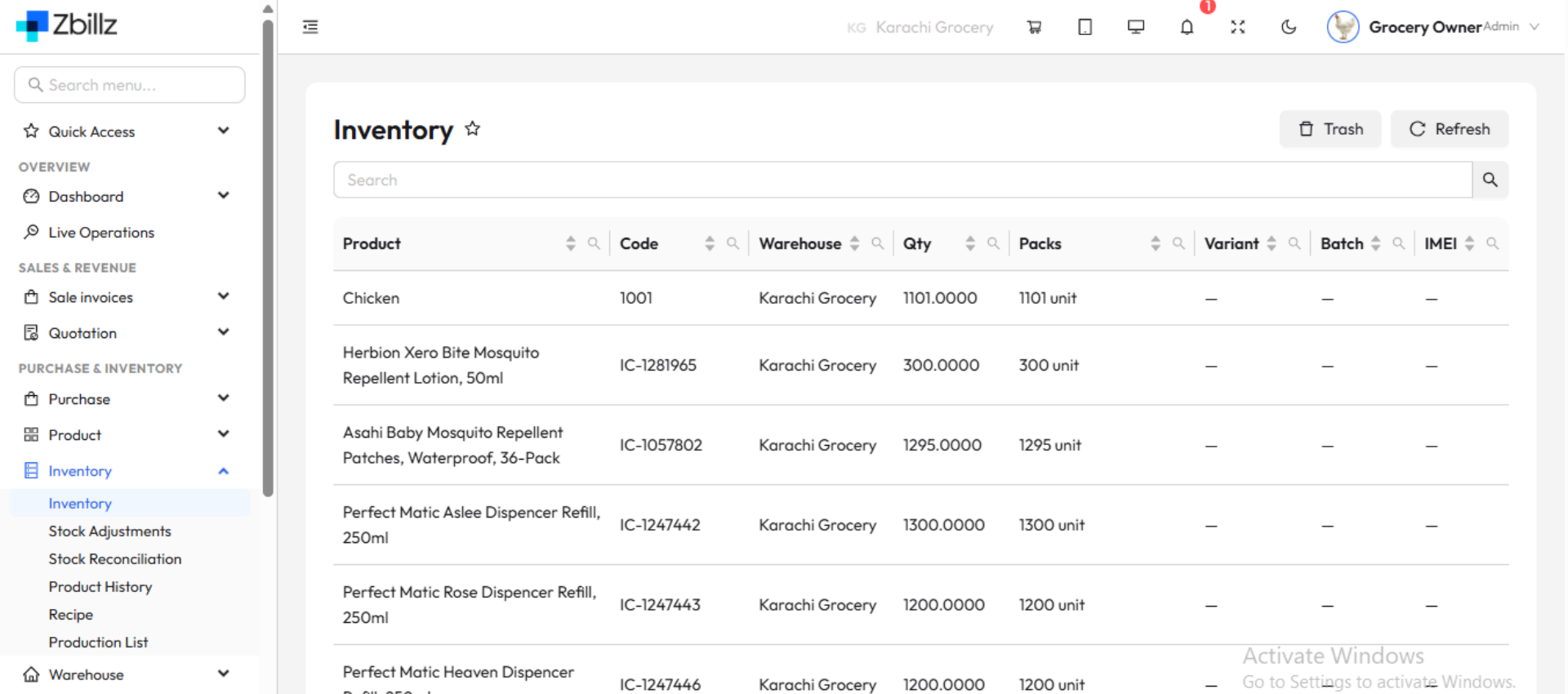
A cloud warehouse inventory system built for restaurants in Pakistan. Track purchases, stock transfers, and consumption across your central warehouse and every branch in real time, with low-stock alerts that stop shortages before they happen.

Real-Time Stock Visibility

See exactly what's in your warehouse and on every branch shelf, updated the moment stock moves.

Cloud Inventory, Every Branch

Stock levels, transfers, and reports sync across all locations from one dashboard.

Connected to Sales & Kitchen

Ingredients are deducted automatically as orders are sold, so your stock always matches reality.

Every Stock Movement, One System

Purchase, transfer, issue, or count. Handle every movement from a single screen.

Purchases (Stock In)

Record supplier deliveries against purchase orders. Check quantities and costs on arrival, and update stock instantly.

Stock Transfers

Send stock from your central warehouse to branches, or between branches, with a full trail of who sent what and when.

Stock Issue (Stock Out)

Issue ingredients to the kitchen or production. Every item that leaves the warehouse is recorded and accounted for.

Stock Count & Adjustments

Run physical stock counts, compare them with system quantities, and adjust for wastage, damage, or expiry with a reason on record.

An All-in-One Inventory Solution

Your inventory system does more than count stock. It protects your margins.
featured

Low-Stock Alerts

Set minimum levels for every item and get notified before you run out. No more last-minute purchases at higher prices.

Supplier & Purchase Management

Keep supplier details, purchase orders, and price history in one place, and compare costs across suppliers.

Detailed Reports

See stock valuation, consumption trends, wastage, and item-wise movement in clear reports, so you can spot leakage early.

From Supplier to Kitchen, Fully Tracked

Follow every item on its journey, so nothing goes missing between the delivery gate and the plate.

Stock arrives

Record the delivery against your purchase order and verify quantity and cost on the spot.

Read More

It's stored and tracked

Items are logged by location, batch, and expiry date, with live quantities always available.

Read More

It's sent where it's needed

Transfer stock to branches with a clear record of sender, receiver, and quantity.

Read More

It's used and reconciled.

Sales and kitchen usage deduct stock automatically. Stock counts show any gaps right away.

Read More

One Warehouse. Every Branch.

Manage your central warehouse and all outlets from a single cloud dashboard, with branch-level stock, transfers, and reports. Grow from one store to many without changing systems.

Warehouse Inventory: Common Questions

It is the process of tracking every item you buy, store, move, and use. Zbillz gives restaurants one cloud system to manage stock across the central warehouse and all branches, from purchase to consumption.

Yes. Track stock at each location, transfer items between them, and view branch-level or combined reports from one login.

Create a transfer from the warehouse to a branch, or between branches. The receiving branch confirms the quantity, and both stock levels update automatically.

Yes. Set a minimum level for each item and Zbillz alerts you before you run out, so you can reorder in time.

Yes. When ingredients are linked to menu items, every sale deducts the right quantities from stock, so your inventory stays accurate without manual entry.

Rocket

Take Control of Your Stock Today

Stop losing money to shortages, over-ordering, and wastage. Start your 14-day free trial. No credit card required.